SQL Interview Questions and Answers
🧠 1. What is MySQL, and How Does It Differ from Other Relational Databases?
MySQL is an open-source Relational Database Management System (RDBMS) that uses Structured Query Language (SQL) to store, manage, and manipulate data. It’s one of the most popular databases globally and forms a key part of the LAMP stack (Linux, Apache, MySQL, PHP/Python/Perl) — the backbone of countless web applications.
🌟 Key Features of MySQL
- ✅ Open Source & Free (also available in paid Enterprise versions)
- ⚙️ Multiple Storage Engines for flexible data handling
- 🖥️ Cross-Platform Support (Windows, Linux, macOS)
- 🚀 High Scalability & Reliability for small to large-scale apps
- 🔐 Secure Authentication System for data safety
⚔️ MySQL vs Other RDBMS: A Quick Comparison
| Feature | MySQL | PostgreSQL | SQL Server |
|---|---|---|---|
| Licensing | Open-source | Open-source | Commercial (Free Express Edition available) |
| Performance | Fast for read-heavy operations | Best for complex analytical queries | High performance with proper tuning |
| JSON Support | Limited | Strong JSON support | Good JSON support |
| Replication | Built-in replication features | Logical & streaming replication | AlwaysOn Availability Groups |
| Best Use Case | Web apps, CMS, e-commerce | Data warehousing, GIS, analytics | Enterprise-level applications |
💡 Why Developers Love MySQL
Because it’s lightweight, easy to learn, and perfect for beginners and professionals alike. Whether you’re running a WordPress blog or building a full-fledged enterprise app, MySQL gives you both speed and stability.
⚡ 2. What Is the Difference Between CHAR and VARCHAR Data Types in SQL?
In SQL, CHAR and VARCHAR are both string data types, but they store and manage text differently.
Understanding this difference is crucial for optimizing database performance and storage.
🧩 CHAR vs VARCHAR: Key Differences
| Feature | CHAR | VARCHAR |
|---|---|---|
| Type | Fixed-length | Variable-length |
| Storage | Always stores the defined length (pads spaces if needed) | Stores only the actual data entered |
| Padding | Adds trailing spaces to match the defined size | No padding — stores data as-is |
| Speed | Faster for fixed-size data | Slightly slower due to variable storage |
| Syntax Example | CHAR(10) | VARCHAR(10) |
💻 SQL Example
CREATE TABLE example (
    id INT,
    name_char CHAR(10),
    name_varchar VARCHAR(10)
);

INSERT INTO example VALUES (1, 'John', 'John');

SELECT
    CONCAT("'", name_char, "'") AS char_output,
    CONCAT("'", name_varchar, "'") AS varchar_output
FROM example;
Output:
| char_output | varchar_output |
|---|---|
'John ' | 'John' |
🧠 Explanation
- CHAR(10) always reserves 10 characters of space, even if the word is shorter (e.g.,
'John'becomes'John '). - VARCHAR(10) stores only 4 characters for
'John', making it more storage-efficient for variable-length data.
💡 Pro Tip
Use CHAR when:
- All data values are uniform in length (e.g., country codes, fixed IDs).
Use VARCHAR when:
- Data length varies frequently, like names, addresses, or emails.
⚙️ 3. What Are the Different Storage Engines Available in MySQL?
A Storage Engine in MySQL determines how data is stored, handled, and retrieved from tables.
Each storage engine has unique features, performance optimizations, and use cases, giving developers flexibility in designing efficient databases.
🧩 🔹 Common MySQL Storage Engines
| Engine | Description | Best Usage |
|---|---|---|
| InnoDB | Default engine since MySQL 5.5. Supports transactions, foreign keys, and crash recovery. | Most common; ideal for general-purpose applications |
| MyISAM | Faster for read-heavy operations but lacks transaction and foreign key support. | Legacy systems or read-only databases |
| Memory | Stores all data in RAM, making it extremely fast but volatile (data lost on restart). | Temporary tables, caching systems |
| CSV | Stores data as CSV files; can be easily opened by external tools. | Data export/import operations |
| Archive | Compresses data efficiently; designed for storing large amounts of historical data. | Archiving and long-term storage |
| Federated | Allows access to data stored on remote MySQL servers. | Distributed database environments |
| Blackhole | Accepts data input but discards it (no actual storage). | Testing or logging without storage overhead |
💻 🔍 View All Available Engines
To list all storage engines supported by your MySQL installation:
SHOW ENGINES;
🧱 🔧 Specify Storage Engine When Creating a Table
You can choose the storage engine explicitly while creating a table:
CREATE TABLE my_table (
    id INT PRIMARY KEY
) ENGINE = InnoDB;
💡 Pro Tip
✅ Use InnoDB for most modern applications — it ensures data integrity, supports ACID transactions, and performs well under concurrent access.
⚡ Use MEMORY only for temporary or high-speed caching needs.
🏗️ 4. How Do You Create a Database and a Table in MySQL?
Creating a database and table in MySQL is one of the first steps every SQL learner or developer performs.
This process defines where your data will be stored and how it will be structured.
🧱 Step 1: Create a New Database
To create a new database, use the CREATE DATABASE statement:
CREATE DATABASE school_db;
✅ This command creates a new database named school_db.
🧭 Step 2: Select (Use) the Database
After creating the database, you need to activate it before creating tables inside it:
USE school_db;
✅ This tells MySQL to perform all upcoming operations inside the school_db database.
📋 Step 3: Create a Table
Now, let’s create a table named students to store student records:
CREATE TABLE students (
    student_id INT PRIMARY KEY AUTO_INCREMENT,
    first_name VARCHAR(50),
    last_name VARCHAR(50),
    email VARCHAR(100),
    enrollment_date DATE
);
✅ Explanation:
student_id→ A unique identifier for each student (auto-increments automatically).first_name&last_name→ Store student names.email→ Stores student email addresses.enrollment_date→ Stores the date each student enrolled.
🧠 Pro Tip
You can verify your database and tables using:
SHOW DATABASES;
SHOW TABLES;
And to view the table’s structure:
DESCRIBE students;🔑 5. What Is the Purpose of PRIMARY KEY and FOREIGN KEY Constraints in MySQL?
In MySQL, keys and constraints play a vital role in maintaining data integrity and defining relationships between tables.
Two of the most important constraints are PRIMARY KEY and FOREIGN KEY.
🧩 PRIMARY KEY
A Primary Key is used to uniquely identify each record in a table.
✅ Key Points:
- Must contain unique values.
- Cannot contain NULL values.
- Each table can have only one Primary Key.
- Ensures that every record is distinct.
📘 Example:
CREATE TABLE departments (
    dept_id INT PRIMARY KEY,
    dept_name VARCHAR(100)
);
Here, dept_id is the Primary Key — it uniquely identifies each department.
🔗 FOREIGN KEY
A Foreign Key is used to link two tables together. It establishes a relationship between a column in one table and a Primary Key in another table.
✅ Key Points:
- Ensures referential integrity between tables.
- Can contain duplicate values unless constrained otherwise.
- Prevents actions that would break relationships (e.g., deleting a department that employees belong to).
📘 Example:
CREATE TABLE employees (
    emp_id INT PRIMARY KEY,
    emp_name VARCHAR(100),
    dept_id INT,
    FOREIGN KEY (dept_id) REFERENCES departments(dept_id)
);
Here, the dept_id in the employees table refers to the dept_id in the departments table — linking both tables together.
🧠 Real-Life Analogy
Think of it like this:
- Primary Key = Your Aadhar number → unique for every person.
- Foreign Key = A reference in another system that uses your Aadhar number to identify you.
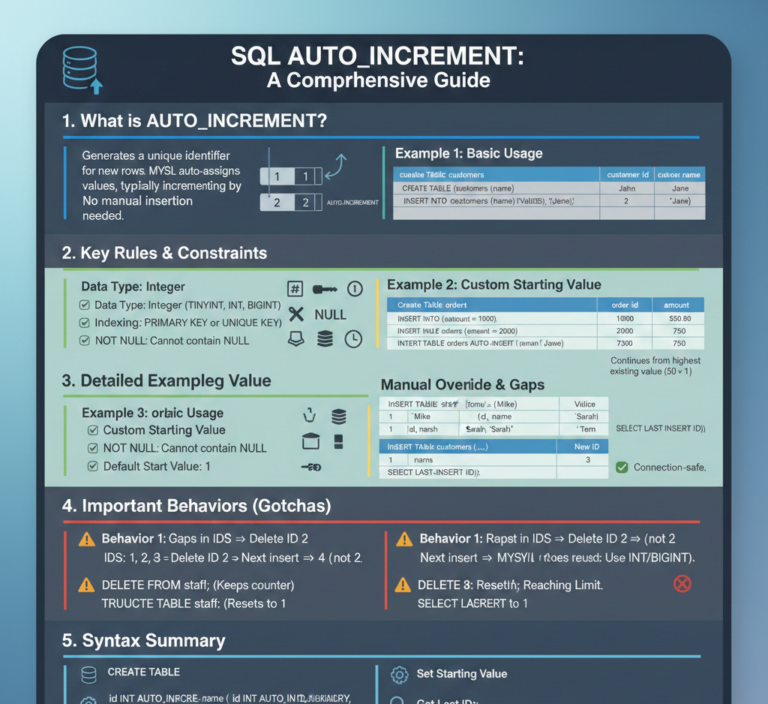
🔢 6. What Is the AUTO_INCREMENT Attribute in MySQL?
The AUTO_INCREMENT attribute in MySQL is used to automatically generate a unique number for a column whenever a new record is inserted into a table.
It’s most commonly used for Primary Key columns, ensuring that each row has a unique identifier without manual input.
⚙️ Key Features of AUTO_INCREMENT
- 🚀 Automatically Increases — generates a unique sequential number for each new record.
- 🔢 Starts at 1 by Default (can be changed using
AUTO_INCREMENT = n). - 🧱 Usually Applied to INT Columns — works best with
INTorBIGINTdata types. - 🔐 Ensures Uniqueness — no need to manually assign IDs.
💻 Example:
CREATE TABLE users (
    user_id INT AUTO_INCREMENT PRIMARY KEY,
    username VARCHAR(50)
);

INSERT INTO users (username) VALUES ('Alice'), ('Bob');
Result:
| user_id | username |
|---|---|
| 1 | Alice |
| 2 | Bob |
Here, MySQL automatically generated unique user_id values for each inserted record.
⚡ Changing the Starting Point
You can set the starting value for the AUTO_INCREMENT column using:
ALTER TABLE users AUTO_INCREMENT = 100;
Now the next record will start from 100 instead of 3.
🧠 Pro Tip
- Use
AUTO_INCREMENTonly on integer columns. - You can retrieve the last inserted auto ID using:
SELECT LAST_INSERT_ID(); - Great for unique identifiers in tables like users, products, orders, or employees.
🧹 7. What Is the Difference Between DELETE, TRUNCATE, and DROP Commands in MySQL?
In MySQL, DELETE, TRUNCATE, and DROP are all used to remove data — but they differ in how much they remove, how fast they work, and whether they can be undone.
Let’s break down their key differences 👇
🧩 Comparison Table
| Command | Description | Reversible? | Logs? | Auto-Increment Reset? |
|---|---|---|---|---|
| DELETE | Removes specific rows based on a WHERE clause. | ✅ Yes (if used within a transaction) | ✅ Yes | ❌ No |
| TRUNCATE | Removes all rows from a table quickly but keeps the structure. | ❌ No | ❌ No | ✅ Yes |
| DROP | Deletes the entire table structure and its data. | ❌ No | ❌ No | ❌ N/A |
💻 Examples
🗑️ 1. DELETE – Remove Specific Records
DELETE FROM employees WHERE emp_id = 1;
Removes only the row where emp_id = 1.
✅ Can be rolled back if used inside a transaction (BEGIN / ROLLBACK).
⚡ 2. TRUNCATE – Remove All Records Quickly
TRUNCATE TABLE employees;
Removes all rows from the table but retains the structure, so you can still insert new data later.
⚠️ Cannot be rolled back.
Also resets AUTO_INCREMENT counters.
💣 3. DROP – Delete the Table Completely
DROP TABLE employees;
Deletes the entire table, including its structure and all data.
⚠️ Once dropped, the table is gone permanently unless recreated.
🧠 Quick Summary
| Action | Keeps Table Structure? | Can Rollback? |
|---|---|---|
| DELETE | ✅ Yes | ✅ Yes (with transaction) |
| TRUNCATE | ✅ Yes | ❌ No |
| DROP | ❌ No | ❌ No |
💡 Pro Tip
Use:
- DELETE → when you need to remove specific records.
- TRUNCATE → when you want to clear all data but keep the table for reuse.
- DROP → when you no longer need the table at all.
⚠️ 8. How Do You Handle NULL Values in MySQL?
In MySQL, NULL represents a missing or unknown value.
It’s not equal to zero, not an empty string, and not even equal to itself — which often confuses beginners.
🧩 Key Facts About NULL
NULL= No Value / Unknown Value- Comparing
NULLwith any value (even anotherNULL) using=returns FALSE - Must use
IS NULLorIS NOT NULLto check forNULLvalues - Use
IFNULL()orCOALESCE()to replaceNULLwith a default value
💻 Examples
✅ 1. Checking for NULL values
Find customers whose phone number is missing:
SELECT *
FROM customers
WHERE phone IS NULL;
✅ 2. Checking for Non-NULL values
Find customers who have a phone number:
SELECT *
FROM customers
WHERE phone IS NOT NULL;
✅ 3. Replacing NULL values
Show “No phone” when the phone number is missing:
SELECT IFNULL(phone, 'No phone') AS contact_info
FROM customers;
Output:
| phone | contact_info |
|---|---|
| NULL | No phone |
| 9876543210 | 9876543210 |
🧠 Pro Tip
You can also use:
COALESCE(phone, 'Not Available')
which works like IFNULL() but can handle multiple fallback values.
💬 Common Mistake
🚫 Wrong:
WHERE phone = NULL;
✅ Correct:
WHERE phone IS NULL;✨ 9. What Are the Various String Functions Available in MySQL?
MySQL provides a rich set of built-in string functions that help you manipulate, analyze, and format text data.
These functions are extremely useful in data cleaning, formatting output, and search operations.
🧩 Commonly Used MySQL String Functions
| Function | Purpose | Example & Output |
|---|---|---|
CONCAT(str1, str2, …) | Combines (joins) two or more strings. | SELECT CONCAT('Hello', ' ', 'World'); → 'Hello World' |
UPPER(str) / LOWER(str) | Converts string case. | SELECT UPPER('hello'); → 'HELLO' |
SUBSTRING(str, start, length) | Extracts a substring from the main string. | SELECT SUBSTRING('abcdef', 2, 3); → 'bcd' |
LENGTH(str) | Returns the byte length of the string. | SELECT LENGTH('abc'); → 3 |
CHAR_LENGTH(str) | Returns the number of characters in a string. | SELECT CHAR_LENGTH('abc'); → 3 |
REPLACE(str, find, replace) | Replaces all occurrences of one substring with another. | SELECT REPLACE('hello world', 'world', 'MySQL'); → 'hello MySQL' |
TRIM(str) | Removes leading and trailing spaces. | SELECT TRIM(' Hello '); → 'Hello' |
LOCATE(substring, str) | Finds the position of a substring in a string (returns 0 if not found). | SELECT LOCATE('l', 'Hello'); → 3 |
💻 Example Usage:
SELECT
  CONCAT(first_name, ' ', last_name) AS full_name,
  UPPER(city) AS city_uppercase,
  LENGTH(email) AS email_length
FROM customers;
This query:
- Combines first and last names,
- Converts city names to uppercase,
- And counts the number of characters in each email.
💡 Pro Tip
- Use
CONCAT_WS(separator, str1, str2, …)to join strings with a separator automatically:SELECT CONCAT_WS('-', '2025', '11', '11'); -- Output: '2025-11-11' - Use
LTRIM()orRTRIM()to remove spaces only from the left or right side.
🧮 10. Explain the Use of the GROUP BY and HAVING Clauses in MySQL
In MySQL, the GROUP BY and HAVING clauses are often used together to summarize and filter aggregated data.
🔹 GROUP BY Clause
The GROUP BY clause groups rows that have the same values into summary rows.
It’s commonly used with aggregate functions like COUNT(), SUM(), AVG(), MIN(), and MAX().
✅ Example:
SELECT department, COUNT(*) AS total_employees
FROM employees
GROUP BY department;
Explanation:
- Groups all employees by their
department. - Counts how many employees are in each department.
🔹 HAVING Clause
After grouping, if you want to filter the groups, you use the HAVING clause.
It works like a WHERE clause but is used after aggregation.
⚠️ Note:
WHEREfilters individual rows, whileHAVINGfilters aggregated groups.
✅ Example:
SELECT department, COUNT(*) AS total_employees
FROM employees
GROUP BY department
HAVING COUNT(*) > 5;
Explanation:
- Groups employees by department.
- Counts employees in each department.
- Filters out any departments with 5 or fewer employees.
💡 Pro Tip
You can use both WHERE and HAVING together:
SELECT department, AVG(salary) AS avg_salary
FROM employees
WHERE active = 1
GROUP BY department
HAVING AVG(salary) > 50000;
Here:
WHEREfilters only active employees before grouping.HAVINGfilters groups with average salary above 50,000.
📘 Summary Table
| Clause | Works On | Purpose | Example Use |
|---|---|---|---|
| WHERE | Rows | Filters rows before grouping | WHERE salary > 40000 |
| GROUP BY | Rows | Groups rows by column(s) | GROUP BY department |
| HAVING | Groups | Filters aggregated results | HAVING COUNT(*) > 5 |
🔹 11. How Do You Retrieve Unique Records from a Table in MySQL?
When you want to remove duplicate values and get only unique records, MySQL provides two main methods — using the DISTINCT keyword or the GROUP BY clause.
✅ 1. Using DISTINCT
The DISTINCT keyword filters out duplicate values from the result set.
🧩 Syntax:
SELECT DISTINCT column_name
FROM table_name;
💡 Example:
SELECT DISTINCT department
FROM employees;
Explanation:
- The query returns unique department names from the
employeestable. - If multiple employees belong to the same department, that department name appears only once.
✅ 2. Using DISTINCT on Multiple Columns
You can also use DISTINCT to get unique combinations of multiple columns.
🧩 Example:
SELECT DISTINCT department, job_title
FROM employees;
Explanation:
- Retrieves each unique combination of
departmentandjob_title. - If the same combination repeats, it will appear only once in the result.
✅ 3. Using GROUP BY as an Alternative
In some cases, GROUP BY can be used to achieve the same effect as DISTINCT.
🧩 Example:
SELECT department
FROM employees
GROUP BY department;
Explanation:
- Groups rows by the
departmentcolumn. - Each department appears once, effectively removing duplicates.
⚖️ DISTINCT vs GROUP BY
| Feature | DISTINCT | GROUP BY |
|---|---|---|
| Purpose | Removes duplicate rows | Groups rows for aggregation |
| Usage | Simple and faster | Used when combining with aggregate functions (COUNT, SUM, etc.) |
| Example | SELECT DISTINCT city FROM customers; | SELECT city, COUNT(*) FROM customers GROUP BY city; |
📘 Pro Tip
To find the total number of unique values in a column:
SELECT COUNT(DISTINCT department) AS unique_departments
FROM employees;
🔹 12. What Is the Purpose of the DISTINCT Keyword in MySQL?
The DISTINCT keyword in MySQL is used to remove duplicate values from the query results.
It ensures that only unique rows are returned, making your output cleaner and more meaningful.
🧩 Syntax
SELECT DISTINCT column_name
FROM table_name;
💡 Example
SELECT department FROM employees;
Output (with duplicates):
DEPARTMENT
HR
IT
HR
Now, apply DISTINCT:
SELECT DISTINCT department FROM employees;
Output (unique values only):
DEPARTMENT
HR
IT
⚙️ How It Works
- MySQL scans all rows in the selected column(s).
- It removes duplicate entries and keeps only one occurrence of each unique value.
- You can also use it across multiple columns to get unique combinations.
Example:
SELECT DISTINCT department, job_title
FROM employees;
This returns unique department-job_title pairs.
📘 Pro Tip
You can count unique values easily:
SELECT COUNT(DISTINCT department) AS unique_departments
FROM employees;
🔹 13. Explain the Difference Between INNER JOIN, LEFT JOIN, RIGHT JOIN, and FULL OUTER JOIN
In MySQL, JOINs are used to combine rows from two or more tables based on a related column between them.
Different types of joins determine which records appear in the final result.
🔸 1️⃣ INNER JOIN
The INNER JOIN returns only the rows that have matching values in both tables.
🧩 Example
SELECT *
FROM orders
INNER JOIN customers ON orders.customer_id = customers.id;
✅ Result
- Shows only those customers who have placed orders.
- Excludes customers with no orders.
📊 Visualization
customers ∩ orders → Matching Rows Only
🔸 2️⃣ LEFT JOIN (LEFT OUTER JOIN)
The LEFT JOIN returns all rows from the left table, along with matching rows from the right table.
If no match exists, the right side shows NULL values.
🧩 Example
SELECT customers.name, orders.order_id
FROM customers
LEFT JOIN orders ON customers.id = orders.customer_id;
✅ Result
- Displays all customers, even those without orders.
- Missing order details will appear as
NULL.
📊 Visualization
customers ⟕ orders → All from LEFT + Matches
🔸 3️⃣ RIGHT JOIN (RIGHT OUTER JOIN)
The RIGHT JOIN is the opposite of LEFT JOIN.
It returns all rows from the right table, along with the matching rows from the left table.
🧩 Example
SELECT customers.name, orders.order_id
FROM customers
RIGHT JOIN orders ON customers.id = orders.customer_id;
✅ Result
- Shows all orders, even those without a matching customer record.
- Missing customer info appears as
NULL.
📊 Visualization
customers ⟖ orders → All from RIGHT + Matches
🔸 4️⃣ FULL OUTER JOIN
The FULL OUTER JOIN returns all rows from both tables, matching where possible.
If no match exists, NULL values fill the gaps.
⚠️ MySQL does not directly support
FULL OUTER JOIN.
🧩 Workaround Using UNION
SELECT *
FROM customers
LEFT JOIN orders ON customers.id = orders.customer_id
UNION
SELECT *
FROM customers
RIGHT JOIN orders ON customers.id = orders.customer_id;
✅ Result
- Combines results of both
LEFT JOINandRIGHT JOIN. - Shows all customers and all orders, whether or not they match.
📊 Visualization
customers ∪ orders → All Data from Both Tables
⚖️ JOIN Comparison Table
| JOIN Type | Returns | Unmatched Rows |
|---|---|---|
| INNER JOIN | Matching rows only | Ignored |
| LEFT JOIN | All from left + matched right | Right side shows NULL |
| RIGHT JOIN | All from right + matched left | Left side shows NULL |
| FULL OUTER JOIN | All rows from both tables | NULL where no match |
🔹 14. How Can You Find the Second-Highest Salary from a Table in MySQL?
Finding the second-highest salary is one of the most frequently asked SQL interview questions.
There are several ways to achieve this — depending on your MySQL version and query preference.
✅ Method 1: Using LIMIT and OFFSET
The simplest and fastest approach.
🧩 Query:
SELECT DISTINCT salary
FROM employees
ORDER BY salary DESC
LIMIT 1 OFFSET 1;
💡 Explanation:
ORDER BY salary DESC→ sorts salaries from highest to lowest.OFFSET 1→ skips the highest salary.LIMIT 1→ picks the next salary (i.e., the second-highest).DISTINCT→ ensures duplicates are not counted twice.
✅ Method 2: Using a Subquery
A classic and widely supported method.
🧩 Query:
SELECT MAX(salary) AS second_highest
FROM employees
WHERE salary < (SELECT MAX(salary) FROM employees);
💡 Explanation:
- Inner query finds the maximum salary.
- Outer query finds the maximum salary less than that — the second-highest value.
✅ Method 3: Using a Window Function (DENSE_RANK)
Best method for modern MySQL (8.0+), especially when handling duplicate salaries.
🧩 Query:
SELECT salary
FROM (
    SELECT salary,
           DENSE_RANK() OVER (ORDER BY salary DESC) AS rnk
    FROM employees
) ranked
WHERE rnk = 2
LIMIT 1;
💡 Explanation:
DENSE_RANK()assigns ranking numbers to salaries in descending order.- The query then filters where
rnk = 2→ the second-highest unique salary. - Works perfectly even if multiple employees share the same top salary.
⚖️ Quick Comparison
| Method | Works In | Handles Duplicates? | Performance |
|---|---|---|---|
| LIMIT & OFFSET | All MySQL versions | Yes (if DISTINCT used) | Fastest |
| Subquery | All MySQL versions | Yes | Reliable |
| Window Function | MySQL 8.0+ | ✅ Best for duplicates | Modern & clean |
🔹 15. What Is a Subquery, and How Is It Different from a JOIN in MySQL?
Both subqueries and joins help in retrieving data from multiple sources, but they work in different ways.
Understanding when to use each is key to writing efficient SQL queries.
🔸 1️⃣ What Is a Subquery?
A subquery is a query nested inside another query.
It’s used to filter, compare, or calculate data dynamically from another result set.
🧩 Example:
SELECT name
FROM employees
WHERE salary > (
    SELECT AVG(salary)
    FROM employees
);
💡 Explanation:
- The inner query
(SELECT AVG(salary) FROM employees)calculates the average salary. - The outer query returns the names of employees earning above the average.
Subqueries can appear in:
WHEREclause (as filters)SELECTclause (for derived values)FROMclause (as inline views)
🔸 2️⃣ What Is a JOIN?
A JOIN combines rows from two or more tables based on a related column (usually a foreign key).
It’s used when you need to merge data from multiple tables into a single result.
🧩 Example:
SELECT e.name, d.dept_name
FROM employees e
JOIN departments d ON e.dept_id = d.dept_id;
💡 Explanation:
- Combines data from both
employeesanddepartmentstables. - Returns employee names along with their department names.
⚖️ 3️⃣ Difference Between Subquery and JOIN
| Feature | Subquery | JOIN |
|---|---|---|
| Definition | A query inside another query | Combines multiple tables |
| Purpose | Used for filtering or deriving computed values | Used for merging related data |
| Performance | Often slower for large datasets | Generally faster due to optimization |
| Readability | Easier for simple conditions | Better for complex relationships |
| Nesting | Can be nested (subqueries inside subqueries) | Cannot be nested directly |
| Use Case | When you need derived or filtered results | When you need to combine tables horizontally |
⚙️ 4️⃣ When to Use What
- Use Subquery → When you need to filter or compute values dynamically.
- Use JOIN → When you need to combine related data from multiple tables efficiently.
🔹 16. Describe the Use of the UNION and UNION ALL Operators in MySQL
The UNION and UNION ALL operators are used to combine the results of two or more SELECT queries into a single result set.
They are often used when you need to merge data from multiple tables or queries that have similar structures.
🔸 1️⃣ UNION
- Combines results from multiple
SELECTstatements. - Removes duplicate rows automatically.
- Performs sorting internally to eliminate duplicates, which can make it slightly slower.
🧩 Example:
SELECT name FROM customers
UNION
SELECT name FROM vendors;
✅ Result:
Returns a list of unique names appearing in either customers or vendors.
⚙️ Key Points:
- Duplicate rows are removed.
- The columns and data types in both queries must match.
🔸 2️⃣ UNION ALL
- Combines results from multiple
SELECTqueries without removing duplicates. - Therefore, it’s faster than
UNION. - Useful when you want all records, even repeated ones.
🧩 Example:
SELECT name FROM customers
UNION ALL
SELECT name FROM vendors;
✅ Result:
Returns all names from both tables, including duplicates.
⚖️ 3️⃣ Difference Between UNION and UNION ALL
| Feature | UNION | UNION ALL |
|---|---|---|
| Duplicates | Removes duplicates | Keeps duplicates |
| Performance | Slightly slower | Faster |
| Sorting | Performs implicit sort for deduplication | No sorting performed |
| Use Case | When you need unique records | When you need all records |
⚠️ Important Rules
- Both queries must have the same number of columns.
- Corresponding columns must have compatible data types.
- Column names in the final output are taken from the first SELECT statement.
🧩 17. How Do You Concatenate Strings in MySQL?
Want to merge columns or text values in MySQL? Use the powerful CONCAT() or CONCAT_WS() functions!
💡 CONCAT() → Joins multiple strings or columns together.
Syntax:
SELECT CONCAT(column1, separator, column2, ...) FROM table;
Example:
SELECT CONCAT(first_name, ' ', last_name) AS full_name
FROM employees;
✨ CONCAT_WS() → Adds a separator automatically between values.
Example:
SELECT CONCAT_WS(' - ', first_name, last_name) AS formatted_name
FROM employees;
🚀 Pro Tip:
Use CONCAT_WS() when you want cleaner formatting (like adding commas, hyphens, or spaces).
💎 18. What Are Aggregate Functions in MySQL? (With Examples)
In MySQL, aggregate functions are used to perform calculations on groups of rows — returning a single summarized value. Think of them as your data’s calculator! 🔢
📘 Common Aggregate Functions:
| 🧮 Function | 💡 Description | 🧑💻 Example |
|---|---|---|
| COUNT() | Counts number of rows | SELECT COUNT(*) FROM employees; |
| SUM() | Adds up numeric values | SELECT SUM(salary) FROM employees; |
| AVG() | Finds the average | SELECT AVG(salary) FROM employees; |
| MIN() | Finds the smallest value | SELECT MIN(salary) FROM employees; |
| MAX() | Finds the largest value | SELECT MAX(salary) FROM employees; |
🔥 Example with GROUP BY:
Want to find average salary per department? Try this:
SELECT department, AVG(salary) AS avg_salary
FROM employees
GROUP BY department;
🚀 Pro Tip:
Always use GROUP BY when you want to aggregate results by category (like departments, regions, or job titles).
⚡ 19. What Is Indexing in MySQL? (With Types, Examples & Pro Tips)
In MySQL, an index works just like a book index — it helps you find data faster without scanning the whole table! 🚀
It’s a performance booster that speeds up SELECT, JOIN, and WHERE queries.
📘 Types of Indexes in MySQL:
| 🔢 Index Type | 💡 Description |
|---|---|
| Primary Key Index | Automatically created on the Primary Key column — ensures uniqueness and fast access. |
| Unique Index | Prevents duplicate values in a column. |
| Composite Index | Index that includes multiple columns for combined lookups. |
| Full-text Index | Used for text searches (via MATCH() and AGAINST() queries). |
| Spatial Index | Supports geographic or GIS data types. 🌍 |
🧑💻 Creating an Index Example:
CREATE INDEX idx_lastname ON employees(last_name);
🔍 Viewing Indexes:
SHOW INDEX FROM employees;
⚠️ When to Use Indexes:
✅ On columns used frequently in WHERE, JOIN, or ORDER BY clauses.
❌ Avoid adding too many indexes — they slow down INSERT, UPDATE, and DELETE operations.
🔥 Pro Tip:
Use EXPLAIN before your query to check if MySQL is actually using your index — this helps you analyze query performance like a pro! 💪
⚡ 20. How to Optimize a Slow-Performing Query in MySQL (Step-by-Step Guide)
Slow SQL queries can ruin your app’s performance. 🚨
To make them faster, you need to analyze, index, and fine-tune your queries for efficiency.
🧠 Step-by-Step Query Optimization in MySQL
1️⃣ Use the EXPLAIN Plan
See how MySQL executes your query.
EXPLAIN SELECT * FROM employees WHERE salary > 50000;
👉 Check if it’s using indexes.
If you see Using filesort or Using temporary, that’s a sign of inefficiency.
2️⃣ Add Indexes
Indexes help MySQL locate data faster.
CREATE INDEX idx_salary ON employees(salary);
💡 Create indexes on columns used in WHERE, JOIN, and ORDER BY clauses.
3️⃣ Avoid SELECT *
Always fetch only what you need.
SELECT id, name FROM employees WHERE salary > 50000;
✔️ Reduces data transfer and improves speed.
4️⃣ Limit the Rows Returned
Use LIMIT to restrict the dataset size.
SELECT name, salary FROM employees ORDER BY salary DESC LIMIT 10;
5️⃣ Use Joins Instead of Subqueries (When Possible)
JOINs are often faster because they let MySQL optimize relationships internally.
SELECT e.name, d.department
FROM employees e
JOIN departments d ON e.dept_id = d.dept_id;
6️⃣ Normalize Your Database
Remove redundant data. Use separate, related tables for cleaner queries and less duplication.
7️⃣ Use Proper Data Types
Choose data types that match the data — e.g., INT for IDs instead of VARCHAR.
8️⃣ Partition Large Tables
Split very large tables into smaller logical pieces for better performance.
PARTITION BY RANGE (YEAR(order_date));
9️⃣ Avoid Deprecated Query Cache
Older MySQL versions used query_cache_size, but newer versions (8.0+) handle caching differently — focus on indexing and schema design instead.
🔟 Use Stored Procedures
Stored procedures run on the server side — this reduces network load and improves performance.
⚙️ Useful Tools & Commands
| Tool / Command | Purpose |
|---|---|
| EXPLAIN ANALYZE (MySQL 8.0+) | Shows the actual execution time of each step. |
| SHOW PROFILE | (Deprecated) Used for older versions to measure query performance. |
| Slow Query Log | Identifies queries that take too long to execute. |
💡 Pro Tip:
✅ Always analyze performance using EXPLAIN ANALYZE.
✅ Focus on optimizing queries executed most frequently.
✅ Review indexes regularly as data grows.
🧩 21. What is Normalization and Denormalization in Database Design?
✅ Normalization
Normalization is the process of organizing data to reduce redundancy and improve data integrity.
Purpose:
- Eliminate data duplication
- Ensure logical data storage
- Improve consistency
Common Normal Forms:
| Normal Form | Rule | Example |
|---|---|---|
| 1NF | No repeating groups; atomic values | Each cell has one value |
| 2NF | Meet 1NF + full dependency on primary key | No partial dependency |
| 3NF | Meet 2NF + remove transitive dependencies | No derived attributes |
| BCNF | Advanced 3NF (handles anomalies) | More strict key dependencies |
Example:
Unnormalized:
| ID | Name | Skills |
|---|---|---|
| 1 | Tom | Java, SQL, HTML |
Normalized:
employees
| ID | Name |
|---|---|
| 1 | Tom |
employee_skills
| emp_id | skill |
|---|---|
| 1 | Java |
| 1 | SQL |
| 1 | HTML |
⚙️ Denormalization
Denormalization intentionally introduces redundancy to improve read performance.
When to use:
- In data warehouses
- To avoid expensive joins
- For frequently accessed reports
Trade-off:
✅ Faster reads
❌ Possible data inconsistency
💳 22. Explain the Concept of Transactions in MySQL
A transaction is a group of SQL operations that are executed as a single unit — either all succeed or none succeed.
🔒 ACID Properties:
| Property | Description |
|---|---|
| Atomicity | All or nothing |
| Consistency | Database remains valid |
| Isolation | Transactions don’t interfere |
| Durability | Changes persist after commit |
🔧 Commands:
START TRANSACTION;

UPDATE accounts SET balance = balance - 500 WHERE account_id = 1;
UPDATE accounts SET balance = balance + 500 WHERE account_id = 2;

COMMIT;  -- or ROLLBACK;
If any step fails:
ROLLBACK;
🧠 Transactions are supported only by transactional engines like InnoDB.
⚙️ 23. What Are Stored Procedures and Functions? How Do They Differ?
🧩 Stored Procedure
A reusable block of SQL code that can take parameters and return result sets.
DELIMITER //
CREATE PROCEDURE GetEmployeeById(IN emp_id INT)
BEGIN
    SELECT * FROM employees WHERE id = emp_id;
END //
DELIMITER ;

CALL GetEmployeeById(1);
🧮 Function
Returns a single value, can be used directly in SQL statements.
DELIMITER //
CREATE FUNCTION GetMaxSalary() RETURNS DECIMAL(10,2)
BEGIN
    DECLARE max_salary DECIMAL(10,2);
    SELECT MAX(salary) INTO max_salary FROM employees;
    RETURN max_salary;
END //
DELIMITER ;

SELECT GetMaxSalary();
⚖️ Key Differences
| Feature | Stored Procedure | Function |
|---|---|---|
| Returns Value | ❌ No (but can use OUT params) | ✅ Yes |
| Returns Result Set | ✅ Yes | ❌ No |
| Used in Expressions | ❌ No | ✅ Yes |
| Modifies Data | ✅ Yes | ❌ Generally No |
| Called in SQL | ❌ No | ✅ Yes |
🚨 24. How Do You Handle Exceptions in Stored Procedures?
MySQL handles exceptions using DECLARE HANDLER.
✅ Syntax:
DECLARE CONTINUE HANDLER FOR NOT FOUND, SQLEXCEPTION, SQLWARNING
BEGIN
    -- handle error
END;
💡 Example:
DELIMITER //
CREATE PROCEDURE UpdateEmployeeSalary(
    IN emp_id INT,
    IN new_salary DECIMAL(10,2)
)
BEGIN
    DECLARE EXIT HANDLER FOR SQLEXCEPTION
    BEGIN
        SELECT 'Error occurred. Rolling back transaction.' AS message;
        ROLLBACK;
    END;

    START TRANSACTION;
    UPDATE employees SET salary = new_salary WHERE id = emp_id;

    IF ROW_COUNT() = 0 THEN
        SIGNAL SQLSTATE '45000' SET MESSAGE_TEXT = 'Employee not found';
    END IF;

    COMMIT;
END //
DELIMITER ;
✅ This ensures database consistency even if an error occurs.
🧠 25. What Is a Trigger in MySQL? Provide an Example Use Case
A trigger is an automated piece of SQL code that executes when an event occurs (INSERT, UPDATE, or DELETE).
🔹 Trigger Types:
- BEFORE INSERT
- AFTER INSERT
- BEFORE UPDATE
- AFTER UPDATE
- BEFORE DELETE
- AFTER DELETE
🧾 Example: Audit Log
CREATE TABLE audit_log (
    log_id INT AUTO_INCREMENT PRIMARY KEY,
    action VARCHAR(50),
    employee_id INT,
    old_salary DECIMAL(10,2),
    new_salary DECIMAL(10,2),
    changed_at TIMESTAMP DEFAULT CURRENT_TIMESTAMP
);

DELIMITER //
CREATE TRIGGER BeforeUpdateSalary
BEFORE UPDATE ON employees
FOR EACH ROW
BEGIN
    IF OLD.salary != NEW.salary THEN
        INSERT INTO audit_log (action, employee_id, old_salary, new_salary)
        VALUES ('salary change', OLD.id, OLD.salary, NEW.salary);
    END IF;
END //
DELIMITER ;
📌 Now every salary update automatically logs a record in the audit_log table.
🧱 26. What is a View in MySQL?
A View is a virtual table based on an SQL query. It does not store data physically; instead, it stores the query definition and executes it dynamically whenever accessed.
✅ Benefits of Using Views:
- Simplifies complex queries.
- Enhances data security (restricts access to specific columns/rows).
- Provides logical abstraction.
- Makes maintenance easier.
⚙️ Create and Use a View
CREATE VIEW high_earners AS
SELECT id, name, salary
FROM employees
WHERE salary > 70000;

SELECT * FROM high_earners;
💡 Views can sometimes be updated — but only if they are based on a single table and no aggregation or grouping is used.
🔍 27. How Can You Implement Full-Text Search in MySQL?
Full-text search allows efficient searching within large text-based columns (like articles, posts, or descriptions).
🪜 Steps to Implement:
- Create a Full-Text Index
ALTER TABLE articles ADD FULLTEXT(title, content); - Use
MATCH ... AGAINSTfor SearchingSELECT * FROM articles WHERE MATCH(title, content) AGAINST('database optimization'); - Boolean Mode (Advanced Search)
SELECT * FROM articles WHERE MATCH(title, content) AGAINST('+optimization +MySQL' IN BOOLEAN MODE);
💡 Supported by MyISAM and InnoDB engines (from MySQL 5.6+).
🔁 28. What is Replication in MySQL and How is it Set Up?
Replication copies data from a primary (master) MySQL server to one or more replica (slave) servers.
Used for load balancing, data redundancy, and high availability.
⚙️ Types of Replication:
- Asynchronous (Default) – Replica may lag behind master.
- Semi-Synchronous – Master waits for replica acknowledgment.
- Group Replication (MySQL 8.0+) – Multi-master setup with automatic failover.
🪜 Setup Overview
Step 1 – Configure Master (my.cnf)
server-id=1
log-bin=mysql-bin
bind-address=0.0.0.0
Step 2 – Create Replication User
CREATE USER repl_user@'%' IDENTIFIED BY 'password';
GRANT REPLICATION SLAVE ON *.* TO repl_user@'%';
FLUSH PRIVILEGES;
Step 3 – Configure Slave (my.cnf)
server-id=2
relay-log=slave-relay-log
bind-address=0.0.0.0
Step 4 – Start Replication
CHANGE MASTER TO
MASTER_HOST='master_ip',
MASTER_USER='repl_user',
MASTER_PASSWORD='password',
MASTER_LOG_FILE='mysql-bin.000001',
MASTER_LOG_POS=4;

START SLAVE;
SHOW SLAVE STATUS\G
💡 If Slave_IO_Running and Slave_SQL_Running both say “Yes”, replication is working.
🧩 29. Explain the Concept of Partitioning in MySQL
Partitioning splits a large table into smaller, more manageable segments (partitions).
Each partition can be processed independently while the table remains logically unified.
⚙️ Types of Partitioning
| Type | Description |
|---|---|
| RANGE | Divides data based on value ranges |
| LIST | Divides data based on a list of values |
| HASH | Distributes data evenly using a hash function |
| KEY | Like HASH but uses MySQL’s internal hashing |
💡 Example (RANGE Partitioning)
CREATE TABLE sales (
    sale_id INT,
    sale_date DATE
)
PARTITION BY RANGE (YEAR(sale_date)) (
    PARTITION p2020 VALUES LESS THAN (2021),
    PARTITION p2021 VALUES LESS THAN (2022),
    PARTITION p2022 VALUES LESS THAN (2023)
);
✅ Benefits:
- Improves query performance
- Simplifies maintenance (e.g., dropping old data)
- Enhances scalability
🔐 30. What Are the Best Practices for Database Security in MySQL?
Security is critical for protecting data integrity, confidentiality, and availability.
🧭 Best Practices Checklist
| # | Security Practice | Description |
|---|---|---|
| 1 | Use Strong Passwords | Enforce password complexity and use caching_sha2_password. |
| 2 | Limit Privileges | Use the GRANT command to restrict permissions. |
| 3 | Avoid Using Root Remotely | Create limited users for applications. |
| 4 | Enable SSL/TLS | Encrypt connections to prevent eavesdropping. |
| 5 | Use Firewall Rules | Restrict access to port 3306 to trusted IPs. |
| 6 | Regular Backups | Use tools like mysqldump or Percona XtraBackup. |
| 7 | Enable Audit Logs | Monitor queries and detect suspicious activity. |
| 8 | Keep MySQL Updated | Apply security patches frequently. |
| 9 | Disable Remote Root Login | Run: |
UPDATE mysql.user SET host = ‘localhost’ WHERE user = ‘root’;
FLUSH PRIVILEGES;
“` |
| 10 | **Encrypt Sensitive Data** | Use Transparent Data Encryption (TDE) or OS-level encryption. |
✅ 31. Data Aggregation in MySQL
Definition:
Aggregation summarizes data using built-in SQL functions to find totals, averages, counts, etc.
Common Aggregate Functions:
| Function | Description | Example |
|---|---|---|
SUM() | Adds all numeric values | SELECT SUM(salary) FROM employees; |
AVG() | Calculates average | SELECT AVG(age) FROM users; |
COUNT() | Counts rows | SELECT COUNT(*) FROM orders; |
MIN() / MAX() | Finds smallest/largest value | SELECT MAX(price) FROM products; |
GROUP_CONCAT() | Combines values into a single string | SELECT GROUP_CONCAT(name) FROM employees; |
Example – Sales Summary:
SELECT
    product_id,
    COUNT(*) AS total_orders,
    SUM(quantity) AS total_units_sold,
    AVG(price) AS avg_price,
    MAX(price) AS max_price
FROM sales
GROUP BY product_id;
With HAVING Clause:
SELECT product_id, SUM(quantity) AS total_sold
FROM sales
GROUP BY product_id
HAVING total_sold > 100;
✅ 32. CASE Statement in MySQL
Definition:CASE allows conditional logic in SQL queries (like if-else).
Syntax:
CASE
    WHEN condition THEN result
    [WHEN another_condition THEN another_result]
    [ELSE default_result]
END
Example – Customer Tier Classification:
SELECT
    customer_id,
    total_spent,
    CASE
        WHEN total_spent > 1000 THEN 'VIP'
        WHEN total_spent BETWEEN 500 AND 1000 THEN 'Regular'
        ELSE 'New'
    END AS tier
FROM customer_summary;
✅ 33. Running Totals (Cumulative Sum)
MySQL 8.0+ Using Window Function:
SELECT
    order_date,
    amount,
    SUM(amount) OVER (ORDER BY order_date) AS running_total
FROM sales;
Older MySQL Versions (Using Variables):
SELECT
    order_date,
    amount,
    @running_total := @running_total + amount AS running_total
FROM sales
JOIN (SELECT @running_total := 0) r
ORDER BY order_date;
✅ 34. Window Functions in MySQL
Definition:
Perform calculations across related rows without grouping them into one result.
Common Window Functions:
| Function | Description |
|---|---|
ROW_NUMBER() | Assigns sequential numbers |
RANK() | Ranks with gaps |
DENSE_RANK() | Ranks without gaps |
LAG() / LEAD() | Access previous/next row |
SUM() OVER() / AVG() OVER() | Cumulative or moving totals |
Example – Ranking Employees by Salary:
SELECT
    id, name, department, salary,
    RANK() OVER (PARTITION BY department ORDER BY salary DESC) AS salary_rank
FROM employees;
✅ 35. Handling Time Zones and Date-Time Functions
Key Functions:
| Function | Description |
|---|---|
NOW() / CURRENT_TIMESTAMP | Current date and time |
CONVERT_TZ(dt, from_tz, to_tz) | Convert between time zones |
DATE(), TIME(), YEAR(), MONTH(), DAY() | Extract date/time components |
DATE_ADD(), DATE_SUB() | Add or subtract time intervals |
TIMESTAMPDIFF(unit, dt1, dt2) | Difference between two timestamps |
Example – Convert to India Time:
SELECT CONVERT_TZ('2025-04-05 12:00:00', 'UTC', 'Asia/Kolkata') AS india_time;
Set Session Time Zone:
SET time_zone = '+05:30';✅ 36. Common Pitfalls When Working with Dates in MySQL
❗ Common Mistakes & Fixes:
| Mistake | Explanation | Correct Practice |
|---|---|---|
| 1. Incorrect Date Format | Using 'MM/DD/YYYY' or ambiguous formats. | Always use 'YYYY-MM-DD' (ISO standard). |
2. Confusing DATE, DATETIME, TIMESTAMP | Misusing date types for different use cases. | Use:DATE → only dateDATETIME → date + timeTIMESTAMP → date-time + timezone aware (auto-update) |
| 3. Comparing Strings Instead of Dates | '2023-01-01' < '2022-12-31' may give unexpected results. | Convert with STR_TO_DATE() before comparison. |
| 4. Ignoring Leap Years / DST | Manual date math fails for complex calendars. | Use built-in date functions like DATE_ADD(), DATE_SUB(). |
5. Confusing CURRENT_DATE vs NOW() | CURRENT_DATE gives only date; NOW() gives date + time. | Use accordingly. |
✅ 37. Generating Reports Using MySQL
Purpose:
Reporting queries summarize business data for decision-making or dashboards.
Steps:
- Aggregate data (using
SUM(),AVG(), etc.) - Format results (
DATE_FORMAT(), aliases) - Join related tables
- Filter and sort data
- Export or visualize via BI tools (Tableau, Power BI, Excel)
Example – Monthly Sales Report:
SELECT
    DATE_FORMAT(order_date, '%Y-%m') AS month,
    SUM(total_amount) AS total_sales,
    COUNT(*) AS orders_count
FROM orders
GROUP BY month
ORDER BY month;
Export Command:
mysql -u user -p -e "SELECT ..." dbname > report.csv
Integrations:
✅ Tableau | ✅ Power BI | ✅ Excel | ✅ Apache Superset
✅ 38. Data Warehousing and MySQL
Definition:
A data warehouse is a centralized system for storing historical, integrated data for analytics and reporting.
Key Characteristics:
- Subject-oriented: Organized by topic (Sales, HR, etc.)
- Integrated: Combines multiple sources
- Time-variant: Historical data stored
- Non-volatile: Read-heavy, not frequently updated
MySQL’s Role:
- Acts as a source system for ETL pipelines.
- Used as a data mart or staging layer for medium-scale analytics.
- Not designed for large-scale OLAP workloads.
ETL Tools Integration:
- Pentaho (Kettle)
- Talend
- Apache Airflow
- Python (Pandas + SQLAlchemy)
✅ 39. Performing ETL Operations in MySQL
ETL = Extract → Transform → Load
| Stage | Description | Example |
|---|---|---|
| 1. Extract | Pull data from sources | SELECT * FROM legacy_system.sales; |
| 2. Transform | Clean, convert, enrich | sql SELECT STR_TO_DATE(date_str,'%d/%m/%Y') AS sale_date FROM raw_sales; |
| 3. Load | Insert into target table | sql INSERT INTO cleaned_sales (...) SELECT ... FROM raw_sales; |
Automation:
- ✅ Stored Procedures
- ✅ Cron Jobs / Scheduled Tasks
- ✅ MySQL Event Scheduler
Example – Daily ETL Event:
CREATE EVENT daily_etl
ON SCHEDULE EVERY 1 DAY
DO
CALL run_daily_transform();
✅ 40. Role of MySQL in Big Data Analytics
While MySQL isn’t a full big data engine, it plays a key supportive role in the analytics ecosystem.
Roles of MySQL:
| Role | Description |
|---|---|
| Source System | Provides operational data to Hadoop/Spark. |
| Staging Layer | Temporarily holds transformed data. |
| Operational DB | Supports real-time dashboards with fast queries. |
| Lightweight Analytics Engine | Handles moderate-scale analytics using indexes. |
| BI Tool Connector | Directly integrates with Tableau, Power BI, Looker, etc. |
Integration with Big Data Stack:
- Apache Sqoop → Data transfer between MySQL and Hadoop
- Apache Kafka → Stream changes in real-time (via binlogs)
- ELK Stack → Send MySQL logs to Elasticsearch for search and analytics
Alternatives for Large-Scale Analytics:
- Amazon Redshift
- Google BigQuery
- Snowflake
- ClickHouse / MariaDB ColumnStore
✅ 41. How Do You Analyze and Interpret the Execution Plan of a Query?
Purpose:
To understand how MySQL executes a query and identify performance bottlenecks.
🔹 Syntax:
EXPLAIN SELECT * FROM employees WHERE department = 'IT';
🔹 Key Columns in EXPLAIN Output:
| Column | Description |
|---|---|
| id | Query part identifier (higher = executed later). |
| select_type | Type of SELECT (SIMPLE, PRIMARY, SUBQUERY). |
| table | Table being accessed. |
| type | Join type (ALL, index, range, ref, eq_ref, const). |
| possible_keys | Indexes that could be used. |
| key | Actual index used. |
| key_len | Length of the key part used. |
| ref | Column or constant used for comparison. |
| rows | Estimated rows examined. |
| Extra | Additional info (Using where, Using filesort, Using temporary). |
🔹 Best Practices:
- Prefer
ref,eq_ref, orrangejoin types. - Avoid full table scans (
type = ALL). - Avoid “Using filesort” or “Using temporary”.
- Keep the
rowsvalue as small as possible.
✅ 42. Common Causes of Slow Queries in MySQL
| Cause | Explanation | Fix |
|---|---|---|
| Missing Indexes | Full table scans | Add indexes on WHERE, JOIN, and ORDER BY columns. |
| **SELECT *** | Fetches unnecessary data | Select only required columns. |
| Unoptimized JOINs | Joining non-indexed or large datasets | Index join keys and filter early. |
| Subqueries Instead of JOINs | Often slower | Replace subqueries with JOIN. |
| Too Many Rows Scanned | Inefficient filtering | Review EXPLAIN plan for rows column. |
| Functions on Indexed Columns | Prevents index use | Avoid WHERE YEAR(date_col) = 2024. Use range queries. |
| Schema Issues | Poor normalization or data types | Redesign schema if necessary. |
| Lock Contention | Table/row locks blocking queries | Optimize transactions, use InnoDB. |
| Disk I/O Bottlenecks | Slow storage | Use caching, SSDs, or memory tuning. |
✅ 43. Improving Performance of JOIN Operations
JOINs combine rows from multiple tables — but can become slow if not indexed or filtered properly.
🔹 Best Practices:
- Use Proper Indexes
CREATE INDEX idx_dept_id ON employees(dept_id); - Avoid Functions in JOIN Conditions
❌ON DATE(e.hire_date) = DATE(d.start_date)
✅ON e.hire_date = d.start_date - Filter Early
ApplyWHEREbeforeJOINto reduce data size. - Use INNER JOIN Instead of LEFT JOIN
If you don’t need unmatched rows. - Select Only Needed Columns
SELECT e.name, d.dept_name FROM employees e JOIN departments d ON e.dept_id = d.id; - Use LIMIT for Pagination
Reduces memory load. - Analyze Execution Plan
EXPLAIN SELECT ... JOIN ...;Check fortype=ALLorUsing temporary.
✅ 44. Use of Indexes and Their Impact on Performance
Definition:
An index is a data structure that improves query speed by allowing MySQL to find data quickly without scanning the entire table.
🔹 Types of Indexes:
| Type | Purpose |
|---|---|
| Primary Key Index | Unique, not null; main table identifier. |
| Unique Index | Ensures no duplicate values. |
| Composite Index | Multi-column index for combined lookups. |
| Full-text Index | Text searching in large text fields. |
| Spatial Index | For GIS (geospatial) data. |
🔹 Example:
CREATE INDEX idx_salary ON employees(salary);
⚠️ Overuse Issues:
- Slower
INSERT,UPDATE,DELETEoperations. - Higher disk usage.
🔹 When to Use:
- Columns used in
WHERE,JOIN,ORDER BY, orGROUP BY.
🔹 Performance Impact:
✅ Faster lookups, filtering, and sorting.
✅ Fewer full table scans.
✅ Improved JOIN speed.
✅ 45. Query Caching in MySQL
Definition:
Query cache stores the results of SELECT statements so identical queries can be served from memory instead of re-execution.
⚠️ Note:
Query cache was removed in MySQL 8.0 due to scalability issues.
🔹 In Older Versions (MySQL 5.x):
# my.cnf
query_cache_type = 1
query_cache_size = 64M
Usage:
SELECT SQL_CACHE * FROM users WHERE role = 'admin';
Limitations:
- Cache invalidated whenever the table changes.
- Inefficient for write-heavy systems.
🔹 Modern Alternatives:
- ✅ Redis / Memcached → Application-level caching.
- ✅ Read Replicas → For load balancing.
- ✅ Materialized Views → For precomputed results.
🔍 46. How to Monitor and Optimize MySQL Server Performance Like a Pro (Complete Guide)
Keeping your MySQL server fast and stable is all about monitoring the right metrics and tuning configurations before performance issues turn into downtime. 🚀
🧩 Step-by-Step Monitoring Techniques
- Check Server Health
SHOW GLOBAL STATUS LIKE 'Threads_connected';✅ Monitors how many connections are active right now. - Find Long-Running Queries
SHOW FULL PROCESSLIST;⚠️ Spot queries that are stuck or consuming high resources. - Enable Slow Query Log
# my.cnf slow_query_log = 1 long_query_time = 1📊 Records queries that take longer than 1 second — great for tuning! - Use Performance Schema
SELECT * FROM performance_schema.events_statements_summary_by_digest;🧠 Analyzes which queries consume the most time. - Monitor InnoDB Engine
SHOW ENGINE INNODB STATUS;🔧 Reveals internal locking, I/O operations, and buffer pool usage. - Leverage External Tools
- 🧭 MySQL Enterprise Monitor – official and enterprise-grade
- ⚙️ Percona Monitoring and Management (PMM) – open source
- 📈 Prometheus + Grafana – custom dashboards and alerts
- 💻 phpMyAdmin / Adminer – quick overview for small projects
💡 Pro Tip:
Set up automated alerts (via PMM or Grafana) so you’re notified of high CPU, slow queries, or memory leaks before users are impacted.
💾 47. What Are the Differences Between MyISAM and InnoDB Storage Engines?
MySQL supports multiple storage engines, but the two most common are MyISAM and InnoDB.
Understanding their differences is essential for designing high-performance, reliable databases.
| ⚙️ Feature | 🗃️ MyISAM | 🔒 InnoDB |
|---|---|---|
| Transactions | ❌ Not supported | ✅ Fully supported (COMMIT, ROLLBACK) |
| Foreign Keys | ❌ Not supported | ✅ Supported for referential integrity |
| Crash Recovery | ❌ Weak recovery | ✅ Automatic crash recovery |
| Locking Granularity | Table-level locking | Row-level locking |
| Full-Text Search | ✅ Supported (older versions) | ✅ Supported (from MySQL 5.6+) |
| Performance | Fast for read-only workloads | Balanced for read/write workloads |
| Default Engine | Default before MySQL 5.5 | Default from MySQL 5.5+ |
| Use Case | Read-heavy, static data | Transactional or dynamic data systems |
💡 Recommendation
Always choose InnoDB for modern applications — it ensures:
- ✅ Data integrity through transactions and foreign keys
- ⚙️ Better performance under concurrent access
- 🔁 Automatic recovery after crashes
Use MyISAM only for legacy systems or read-only datasets where transaction support isn’t required.
⚙️ 48. How Do You Handle Large Datasets in MySQL?
Managing large datasets in MySQL can become challenging as the data volume grows.
To maintain speed, scalability, and reliability, you need a mix of database design strategies and query optimization techniques.
🧩 Top Techniques to Handle Large Datasets Efficiently
1. 🧭 Indexing
Create indexes only on columns that are frequently used in WHERE, JOIN, or ORDER BY clauses.
Avoid over-indexing — too many indexes can slow down INSERT and UPDATE operations.
CREATE INDEX idx_order_date ON orders(order_date);
2. 📊 Partitioning
Split large tables into smaller, manageable parts (partitions) for faster access and maintenance.
Example using RANGE partitioning:
CREATE TABLE sales (
    sale_id INT,
    order_date DATE
)
PARTITION BY RANGE (YEAR(order_date)) (
    PARTITION p2020 VALUES LESS THAN (2021),
    PARTITION p2021 VALUES LESS THAN (2022)
);
✅ Benefit: Queries targeting specific date ranges run much faster.
3. 🗂️ Archiving Old Data
Move old or less frequently used data to a separate archive table or database.
- Speeds up queries on the active dataset.
- Keeps backups and restores faster.
4. ⚡ Batch Processing
Instead of handling millions of rows at once, process data in smaller batches.
Example using pagination:
SELECT * FROM logs LIMIT 1000 OFFSET 0;
✅ Prevents memory overload and improves stability.
5. 🌐 Sharding
Distribute large datasets across multiple servers (shards).
Each shard stores a portion of the data based on logic like user ID, region, or time.
- Improves scalability.
- Requires application-level routing or middleware (e.g., Vitess, ProxySQL).
6. 🧱 Optimized Schema Design
- Use the right data types (e.g.,
INTinstead ofBIGINTwhen possible). - Normalize data to reduce redundancy.
- Use foreign keys wisely for referential integrity.
7. 🚀 Caching Layer
Use caching systems like Redis or Memcached to reduce repeated database hits.
Common for storing frequently accessed data like user sessions, configurations, or popular queries.
8. 🧩 Read Replicas
Create read-only replicas of your database to offload heavy read queries from the primary database.
This boosts performance for analytics and reporting workloads.
✅ Summary
Efficiently handling large datasets in MySQL depends on:
- Smart schema design
- Query optimization
- Scalable architecture (replication, sharding, caching)
Together, these practices ensure your MySQL database stays fast, reliable, and future-ready even with millions of records.
49. What are the considerations for scaling MySQL databases?
Scaling in MySQL means ensuring that the database can handle increasing data volume, user traffic, and transaction load efficiently. It involves both hardware and architectural improvements.
⚙️ Horizontal vs. Vertical Scaling
| Type | Description | MySQL Support |
|---|---|---|
| Vertical Scaling | Add more resources (CPU, RAM, SSD) to the same server. | ✅ Easy to implement |
| Horizontal Scaling | Add more MySQL servers and distribute load (data or queries). | ⚙️ Requires replication or sharding |
🚀 Scaling Strategies
1. Replication
- Master-Slave Replication: The master handles writes; slaves handle reads.
- Master-Master Replication: Both nodes can handle reads/writes with synchronization.
- Purpose: Improves read performance and provides failover capability.
CHANGE MASTER TO MASTER_HOST='master_ip', MASTER_USER='replica_user', MASTER_PASSWORD='password';
START SLAVE;
2. Sharding
- Divide data horizontally across multiple servers.
- Each shard contains a portion of data (e.g., users A–M on one server, N–Z on another).
- Pros: Increases both read and write scalability.
- Cons: Complex setup and application-level routing needed.
- Tools: Vitess, ProxySQL, or custom logic.
3. Connection Pooling
- Reuse existing database connections instead of creating new ones for every request.
- Reduces CPU and memory overhead.
- Tools: ProxySQL, HikariCP, or built-in pooling in frameworks.
4. Load Balancing
- Distribute traffic evenly across multiple MySQL instances.
- Prevents any single server from being overloaded.
- Tools: HAProxy, MaxScale, Nginx (with MySQL routing modules).
5. Caching
- Cache frequent queries to reduce database load.
- In-memory stores: Redis, Memcached.
- Example: Cache popular product data or user sessions.
6. Partitioning
- Split large tables into smaller logical partitions.
- Example: Partition by date, region, or user ID.
PARTITION BY RANGE (YEAR(order_date)) (
    PARTITION p2023 VALUES LESS THAN (2024),
    PARTITION p2024 VALUES LESS THAN (2025)
);
7. Monitoring & Alerting
- Continuously track performance metrics like query time, CPU usage, IOPS, and replication lag.
- Tools:
- MySQL Enterprise Monitor
- Percona Monitoring and Management (PMM)
- Grafana + Prometheus
💡 Recommendation:
Start with replication and caching for most production systems. For massive scaling, consider sharding and read replicas, and always monitor performance metrics.
50. How do you ensure data integrity and consistency in a MySQL database?
Data integrity means maintaining accuracy, consistency, and reliability of data throughout its lifecycle — from insertion to update and deletion.
MySQL provides several mechanisms at both database and application levels to ensure this.
🧩 1. Primary Keys
- Ensure each record in a table is uniquely identifiable.
- Prevents duplicate records.
CREATE TABLE employees (
    id INT PRIMARY KEY AUTO_INCREMENT,
    name VARCHAR(50),
    salary DECIMAL(10,2)
);
🔗 2. Foreign Keys
- Maintain referential integrity between related tables.
- Ensures that a child record cannot exist without a corresponding parent record.
CREATE TABLE employees (
    emp_id INT PRIMARY KEY AUTO_INCREMENT,
    name VARCHAR(50),
    dept_id INT,
    FOREIGN KEY (dept_id) REFERENCES departments(id)
);
⚙️ 3. Constraints
- Enforce rules at the column level to maintain valid data.
| Constraint | Purpose | Example |
|---|---|---|
| NOT NULL | Prevents null values | salary DECIMAL(10,2) NOT NULL |
| UNIQUE | Prevents duplicates | email VARCHAR(100) UNIQUE |
| CHECK | Enforces a condition | CHECK (age >= 18) |
🔄 4. Triggers
- Automate data consistency checks or business logic after certain operations.
CREATE TRIGGER update_inventory
AFTER INSERT ON orders
FOR EACH ROW
BEGIN
    UPDATE inventory
    SET stock = stock - NEW.quantity
    WHERE product_id = NEW.product_id;
END;
✅ Example: Automatically updates stock levels after a new order is placed.
💰 5. Transactions
- Guarantee ACID properties (Atomicity, Consistency, Isolation, Durability).
- Ensure either all operations succeed or none are applied.
START TRANSACTION;
UPDATE accounts SET balance = balance - 100 WHERE id = 1;
UPDATE accounts SET balance = balance + 100 WHERE id = 2;
COMMIT;
If any statement fails, use:
ROLLBACK;
💾 6. Backups
- Regular data backups prevent data loss and help restore integrity after crashes.
- Tools:
mysqldumpfor logical backups- Binary log backups for point-in-time recovery
mysqldump -u root -p mydatabase > backup.sql
🧮 7. Application-Level Validation
- Validate user input before writing to the database.
- Examples:
- Ensure required fields are filled.
- Check numeric ranges or string lengths.
📜 8. Audit Logs
- Track and log every change (INSERT, UPDATE, DELETE) for accountability.
- Can be done using triggers or MySQL’s built-in binary logs.
CREATE TRIGGER log_changes
AFTER UPDATE ON employees
FOR EACH ROW
INSERT INTO audit_log (emp_id, old_salary, new_salary, changed_on)
VALUES (OLD.id, OLD.salary, NEW.salary, NOW());
💡 Recommendation:
Use a combination of:
- InnoDB engine (for ACID compliance),
- constraints (for structural integrity),
- transactions (for business logic),
- and backups + auditing (for long-term consistency).
About the Author